What Is a Property Management Dashboard? Top 5 Tools
- Dec 24, 2025
- 9 min read
Updated: Dec 26, 2025
Managing multiple properties means handling financials, maintenance, tenants, and owners all at once. Doing this by hand or with spreadsheets causes missed details and slower response times.
A property management dashboard centralizes active property data in a single view. It turns the tiresome task of watching over properties into a manageable assignment.
This article explains what a property management dashboard is and reviews five tools property management companies use to manage their portfolios.
TL;DR
These are the best property management dashboards:
Rentvine
Buildium
RentRedi
Propertyware
What Is a Property Management Dashboard?
A property management dashboard is a visual tool that property owners and property managers use to monitor portfolio performance. It organizes property details into a single dashboard.
The dashboard of property management software usually includes the following features:
Key performance indicators (KPIs): This section tracks occupancy rates, rent collection, lease expirations, utility usage, maintenance requests, and operating expenses.
Visualizations: Key metrics are displayed through charts, graphs, and tables that show trends and comparisons across properties.
Drill-down capabilities: Managers can review property details at the unit level, including specific units, resident data, and maintenance history.
Filtering and customization: The dashboard can filter data by property, date range, or other criteria to focus on specific properties or time periods.
Reporting and exporting: Managers can export reports that include financial metrics, property data, and portfolio summaries for owners or stakeholders.
Tenant portals and maintenance requests: Includes features for residents to pay rent online, submit maintenance requests via app, and communicate with management.
With all key data visible at once, property managers spot issues sooner and respond with accurate information.
5 Best Property Management Dashboards for Daily Operations
Below are five of the best property management dashboards that help managers track utility usage, financial documents, and other key metrics across their portfolio.
1. DrizzleX's Dashboard for Water Usage Monitoring

DrizzleX is a smart water monitoring system that gives property owners real-time insight into water usage across their entire portfolio.
Their IoT micrometers are installed on every water fixture across the building, including apartments and shared areas.
Each micrometer measures water flow and sends usage data to the DrizzleX cloud gateway, which collects and processes all water activity.
Within its dashboard, property managers can see fixture-level water data and receive live alerts whenever water leaks or overuse occur.
DrizzleX can also let you create bills based on accurate consumption, which supports fair and accurate tenant billing.
Key Features of DrizzleX’s Dashboard
Portfolio-level water usage: Displays total water consumption across all properties, making usage trends easy to track.
Apartment-level breakdowns: Breaks down usage by each apartment so managers can see which units use more water.
Fixture-level tracking: Micrometers measure water at sinks, showers, and toilets, and send real-time data to a central hub for detailed tracking.
Leak detection: Flags silent leaks in real time that would otherwise go unnoticed until they appear on a water bill.
Overuse alerts: Sends notifications when water usage exceeds normal patterns.
Billing and maintenance support: Uses precise usage data to generate tenant bills and schedule repairs.
AI Predictions for Water Usage
DrizzleX offers AI-powered predictions that help property owners anticipate future water consumption.
The system compares each unit’s water usage against a large database of average usage ranges and occupancy patterns. It also factors in location, climate, and demand trends.

Using this data, DrizzleX estimates how many tenants likely occupy a unit. While changes in resident behavior can affect accuracy, the model highlights usage patterns that fall outside expected ranges.
These insights help property managers manage consumption before water bills increase. Spotting patterns early supports long-term energy savings and sustainable property management.
2. Rentvine's Dashboard for Financial Tracking

Source: rentvine.com
Rentvine is property management software that centralizes financial records, tenant activity, and maintenance data for residential portfolios.
Its real estate dashboard displays rental income, operating expenses, vacancy rates, and maintenance tracking in one view.
Rentvine also supports multifamily revenue management by comparing rental income with market conditions.
Owners and managers use this data to adjust pricing, monitor vacancy rates, and protect long-term portfolio value.
Key Features of Rentvine’s Owner Portal
Customizable dashboards: Track rent collection, operating costs, vacancy rates, and maintenance tracking through configurable views.
Access to financial data: Owners can log in anytime to review reports, statements, and transaction history, making it easy to stay on top of portfolio performance.
Property insights: Display rental income and maintenance costs to assess how each property contributes to total property value.
Direct communication: Use built-in messaging to stay connected, share updates, and resolve issues between property managers and owners.
Document sharing: Download leases, agreements, inspection reports, and other important documents directly from the portal.
3. Buildium Dashboard for Tracking Property NOI

Source: buildium.com
Buildium is multifamily property software used by managers, agents, and property owners to review financial results and property activity.
The platform centers on income, expenses, and owner reporting.
With Buildium’s dashboard, managers can track occupancy, control expenses, and improve communication with every group involved in the business.
Managers also see rent collection, service requests, and property maintenance costs in the same view.
Key Features of Buildium's Owner Portal
Real-time financial reports: Access profit and loss statements, balance sheets, income statements, detailed transactions, and manage property NOI from any device.
Payment tools: Collect contributions and draws while allowing owners to view transaction history by property.
Document sharing: Upload receipts, leases, inspection reports, and other important items so owners can download them anytime.
Mobile access: The portal is mobile-friendly, giving owners access to financial data and reports without phone calls or emails.
Communication tools: Use built-in templates for email or printed mailings with EZMail to send updates and notices to owners.
4. RentRedi for Collecting Rent via Mobile App

Source: rentredi.com
RentRedi makes it simple for owners to manage rent collection from a single property dashboard.
The mobile app processes rent payments for tenants and records payment status for owners. Late fees apply automatically based on lease terms.
Payment history stays attached to each unit, so owners can review past payments and late fees without cross-checking records.
RentRedi also shows payment trends across units or an entire portfolio. This makes recurring late payments and missed rent easier to spot before they affect cash flow.
Key Features of RentRedi
Easy rent collection: Collect rent online without hidden fees, track payments, and manage late fees from the dashboard.
Recurring payments and late fees: Set up automatic recurring payments or recurring late fees to keep revenue consistent and leases enforced.
Owner controls: Owners can accept partial rent payments, block payments in the case of evictions, or pass processing fees along to tenants.
Financial reporting: Export rent payments to spreadsheets or QuickBooks Online for a clear view of revenue and payment history.
Notifications: Send in-app notices by unit, property, or across the portfolio to keep tenants informed.
5. Propertyware for Automation and Open Access Property Management

Source: propertyware.com
Propertyware is used by managers and real estate investors who need direct access to financial records and portfolio data. It focuses on reporting, owner access, and system connectivity.
The property dashboard shows financial reports, transaction records, and owner documents in one view.
Managers review operating costs, rent activity, and account balances without exporting files or compiling reports.
Propertyware also connects with external systems through its open API. These integrations make it easier to see how expenses, income, and maintenance decisions affect the total value of each property.
Key Features of Propertyware
Custom dashboards and reports: Build reports that track financial performance and key metrics across individual properties or the entire portfolio.
Owner portal: Give owners access to ledgers, portfolio documents, and financial updates tied to their investments.
Transactions: Manage contributions and distributions within the owner portal, with email notifications for payments, tenant notices, and other key events.
Customization and workflows: Control what each group sees, build unique workflows, and apply automation to standardize routine tasks.
Open API: Connect Propertyware to other software systems, reduce duplicate entry, and simplify operations with secure two-way data exchange.
What Property Management Dashboard Offers
Managing a single rental might not require advanced tools, but once you’re handling a large portfolio, manual spreadsheets and endless emails won’t cut it.
Here are the most valuable ways a property management dashboard supports property management companies.
Resident Analytics
A management dashboard shows who is living in each unit, how long they’ve stayed, and when their leases expire.
Managers can see occupancy rates across the entire portfolio and identify properties with high turnover.
Some dashboards even calculate resident lifetime value, making it easier to see which properties bring long-term stability.
With this information, managers can refine strategies to improve tenant satisfaction. They can offer renewal incentives or adjust marketing spend in areas with lower retention.
Financial Insights
A property management dashboard displays revenue, expenses, and financial performance across a portfolio.
At the portfolio level, tracking can include total property value, revenue by market, and overall operating costs.
On the property side, you might review missed payments, income lost from vacancies, and marketing spend per new tenant.
Having all financial data in one place allows stakeholders to make informed decisions about budgets, investments, and cost-saving opportunities.
Maintenance Workflows
Maintenance dashboards make it easier to keep up with requests by showing new, pending, and completed work orders.
Automated alerts can highlight urgent issues, such as water leaks or heating failures, that need immediate attention.
Managers can also use the dashboard to review response times and identify repeat issues in specific units.
For instance, if one property has frequent plumbing issues, managers can schedule preventive inspections rather than wait for tenants to report problems.
Scheduling and Coordination
Dashboards help managers organize inspections, schedule preventive maintenance, and coordinate contractor work. Everything can be assigned, tracked, and closed within the dashboard.
When managers follow a maintenance checklist, they can schedule seasonal service across multiple buildings and track completion in real time.
This level of coordination reduces missed appointments and keeps repairs from falling behind schedule.
Work Order Automation
Work order automation creates a task as soon as a tenant submits a maintenance request. The system records the issue, timestamps it, and tracks progress until the job is complete.
When a tenant reports a running toilet, the system generates a work order, assigns it to the appropriate contractor, and sends a scheduling update to the tenant.
Over time, this record of maintenance requests helps managers identify repeat issues and address them earlier. Tenants also stay informed, which cuts down on follow-up requests.
Budget Control
A dashboard helps managers track expenses by unit and property, which makes spending patterns easier to see. Utility costs, repairs, and recurring charges stay visible.
When one property shows higher-than-normal utility costs, the data highlights the issue right away.
Managers can trace the expense to specific units or systems and decide whether repairs, upgrades, or usage changes are required.
Over time, this cost history helps managers compare properties, set realistic budgets, and catch overspending early.
Access From Anywhere
One of the latest property management trends is a cloud-based dashboard. It keeps property data available on any device, whether managers work on-site, in the office, or off-site.
Work orders, budgets, tenant records, and property details stay accessible without relying on local systems.
During storms or emergencies, access doesn’t stop. Managers can review open service requests, assign repairs, and update residents remotely.
Remote access also supports proactive maintenance by offering insights into recurring issues and unresolved requests.
When properties span multiple markets, one dashboard keeps oversight consistent without physical access to each site.
Start Saving Water and Money With DrizzleX

Water waste increases operating costs and often stays hidden until a utility bill arrives.
With DrizzleX, multifamily property owners gain real-time insights into water usage, detect hidden leaks, and prevent overuse by tenants.
Instead of reviewing monthly bills, managers can see which apartments, fixtures, or time periods drive higher water consumption.
This supports informed decision-making by showing exactly where leaks or abnormal usage start.
Managers can then locate leaks, confirm repairs, and address overuse before costs escalate.
Most buildings cut water bills by 20–40% and reach payback in less than a year.
See Real Results With DrizzleX
DrizzleX reduces water waste by detecting leaks at individual fixtures and tracking usage patterns across apartments.
In just nine months, a 281-unit property in Washington, DC, cut water bills by 49%, saving more than $158,000.
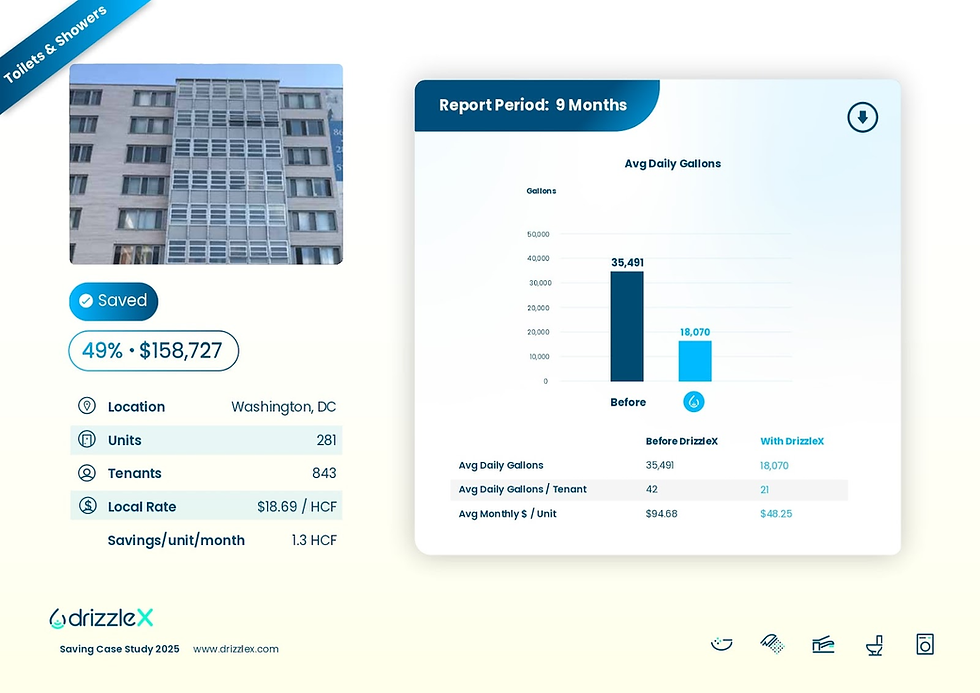
Average daily water use dropped from 35,491 gallons to 18,070 gallons, which reduced the cost per unit by nearly half.
These results show how DrizzleX’s real-time alerts and usage tracking helped cut water waste and delivered a faster return on investment.
FAQ About Property Management Dashboard
What are the five Ps of property management?
The five Ps of property management are People, Property, Promotion, Price, and Process. Together, they cover tenant relationships, building upkeep, marketing, pricing, and daily property operations.
A management dashboard helps keep these areas aligned by giving managers a clear picture of performance across the portfolio.
What is the most popular property management software?
The most popular property management software is Buildium, though AppFolio and Yardi are also widely used.
While these handle rent, accounting, and maintenance, DrizzleX works alongside your operations by monitoring water use, alerting you to leaks, and helping reduce utility bills.
How to create a management dashboard?
To create a management dashboard, use a tool like Google Data Studio, Excel, or built-in reporting features in your property management software.
Include key data such as rent collection, occupancy, and maintenance requests.
Multifamily property software also helps by bringing all this information together in one place so you can track everything more easily.
What does a management dashboard look like?
A management dashboard is a single screen that lists key property metrics in tables and basic charts.
Managers typically check rent collection status, occupancy rates, open maintenance requests, and recent expenses


